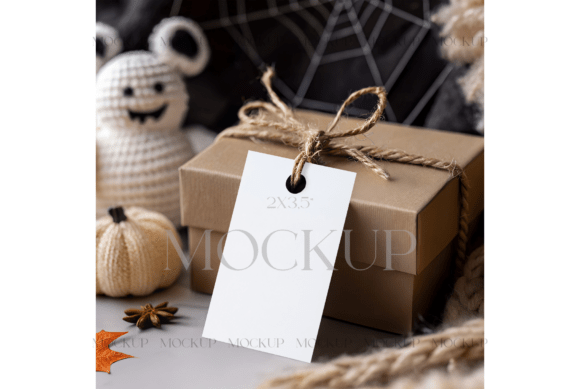
Halloween Gift Tag Mockup for Spooky Branding
Crafting Festive Visuals with Halloween-Themed Mockups
A Halloween Gift Tag Mockup offers a seasonal and professional way to showcase your creative designs. Whether you're a small business owner, a digital creator, or a marketer, this type of mockup provides a visually engaging way to present holiday branding, product labels, or printable designs. Featuring a kraft paper gift box tied with rustic twine and a blank vertical tag, this mockup is elevated by surrounding elements like a crocheted ghost, knitted pumpkin, autumn leaves, and a subtle spider web backdrop. These details bring a warm, handmade aesthetic that aligns perfectly with Halloween's cozy and spooky spirit.
Why This Mockup Works for Seasonal Branding
The Halloween Gift Tag Mockup is more than just a decorative layout—it’s a practical tool for visual storytelling. The rustic and tactile textures in the design evoke a sense of authenticity, making it ideal for brands that want to communicate craftsmanship and seasonal charm. The kraft paper box and twine are familiar, approachable materials that resonate well with eco-conscious consumers or handmade product lines. The mockup’s vertical tag offers a clean space to display custom graphics, logos, or handwritten-style text, allowing for a personalized and branded look.
Whether you're designing for a local bakery's Halloween-themed packaging or a boutique's seasonal product line, this mockup helps your visuals stand out while maintaining a cohesive and festive theme. It's especially useful for small businesses or creatives who want to maintain a professional appearance without investing in custom photo shoots.
Key Features That Make a Difference
One of the standout features of this mockup is its use of layered, seasonal elements. The crocheted ghost and knitted pumpkin add texture and whimsy, while the star anise and autumn leaves bring in organic, earthy tones. The spider web backdrop subtly reinforces the Halloween theme without overwhelming the design. These elements work together to create a scene that feels both festive and authentic.
From a technical standpoint, the mockup includes a PSD file with Smart Object layers, allowing for seamless customization. You can easily insert your own graphics by double-clicking the smart object layer in Photoshop, dragging your design onto the template, adjusting the size, and saving your changes. This streamlined workflow makes it accessible even for users with basic Photoshop knowledge.
Practical Uses Across Different Industries
This mockup has broad appeal and can be used in a variety of professional and creative settings:
- Retailers can use it to showcase seasonal product packaging or branded gift tags.
- Print-on-demand sellers can present Halloween-themed printable designs like labels, tags, or party favors.
- Bloggers and content creators can enhance their holiday-themed posts with high-quality visuals that align with their brand.
- Educators and crafters can use the mockup as a template for handmade Halloween projects or classroom decorations.
- Event planners can design custom gift tags or favor labels for themed parties or corporate events.
Because the mockup comes with a high-res JPG file, it's also suitable for social media marketing, digital ads, or email campaigns where visual appeal plays a key role in engagement.
Benefits of Using Seasonal Mockups
Using a Halloween Gift Tag Mockup offers several practical benefits beyond just aesthetics. It enhances brand consistency by allowing you to preview how your designs will look in a real-world context. It also improves customer communication by presenting your products or services in a relatable, visually appealing format. Additionally, it supports marketing efficiency—you can create polished visuals quickly without the need for photography or complex design setups.
For creators and entrepreneurs, this mockup can streamline the design review process and help clients visualize the final product before printing or production. It also makes it easier to update seasonal branding year after year, offering a reusable template that can be refreshed with new graphics or color schemes.
How to Get the Most Out of This Mockup
To maximize the value of the Halloween Gift Tag Mockup, consider the following tips:
- Use high-contrast graphics on the vertical tag to ensure your design stands out clearly against the textured background.
- Experiment with different color palettes that reflect Halloween themes—think burnt orange, deep purple, black, and earthy green.
- Match your font choices to the rustic and handmade feel of the mockup. Script fonts or textured typefaces can enhance the seasonal vibe.
- Layer your designs thoughtfully to avoid overcrowding the scene. Let the mockup’s natural elements complement your branding rather than compete with it.
- Save variations of your final design for different marketing channels—social media, print, packaging, or digital downloads.
Remember, the goal is to create visuals that feel both professional and festive. The Halloween Gift Tag Mockup provides the perfect foundation, but your creative choices will determine how well it resonates with your audience.
Final Thoughts on Halloween-Themed Design Tools
Whether you're designing for a holiday collection, a personal craft project, or a seasonal marketing campaign, the Halloween Gift Tag Mockup is a versatile and effective resource. Its combination of rustic materials, seasonal textures, and customizable layout makes it a valuable asset for anyone looking to create compelling Halloween visuals without the hassle of physical setup or photography.
By using this mockup, you can elevate your design presentation, save time, and maintain a cohesive brand image throughout the Halloween season. As with any design tool, the key is to use it thoughtfully—aligning your visuals with your brand identity and audience expectations. When done right, this mockup becomes more than just a template—it becomes a powerful part of your seasonal storytelling toolkit.